Alright small biz owners let’s get real. Do you find yourself wishing you could make regular updates to your website quickly and confidently? Sick of struggling through a clunky template or not-so-helpful “help desks” as you try to figure out what the heck went wrong when you were updating website content? Then this is for you. Let’s dive into the top reasons Showit is the best web design platform for creatives, entrepreneurs, and small business owners who want to save time, stress less and feel confident maintaining their website.
Drag and Drop Website Design.
It’s as easy as it sounds. There are no limitations to where you can put images, text, links, etc. You literally have a blank canvas. You can be as creative as you want. I didn’t fall in love with web design or make the career pivot to being a designer until I found Showit. Yes, it’s cheesy AF to say, but the sky is literally the limit. Put that image, button, copy, or whatever else you want – where you actually want it.
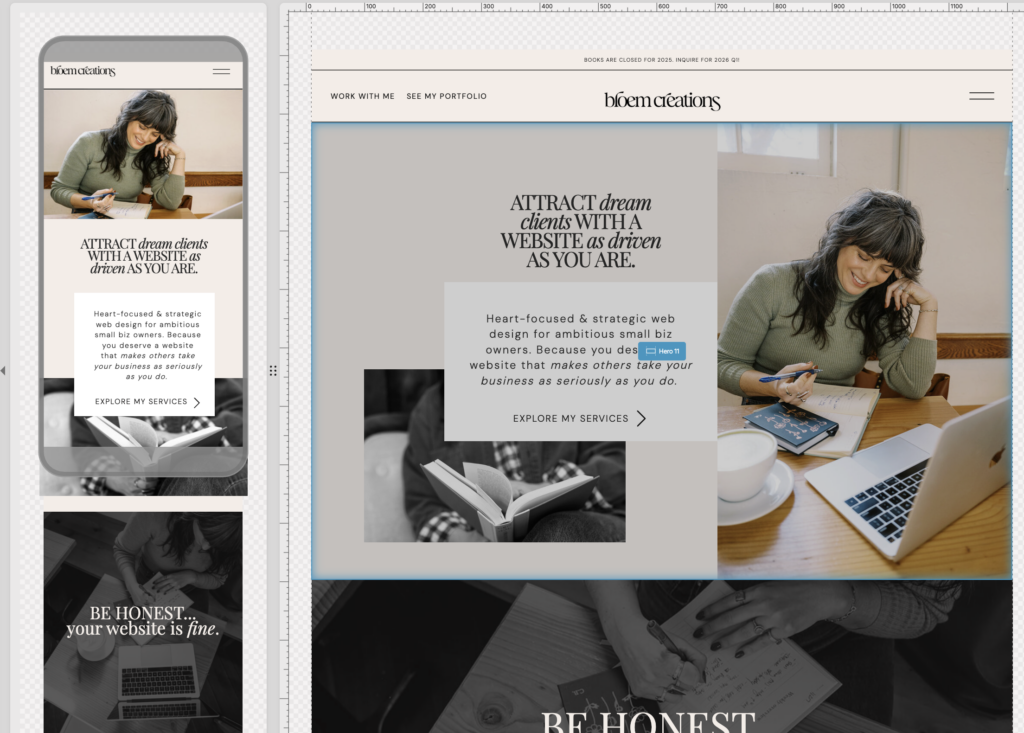
Mobile vs. Desktop Design
You can work on the two designs side-by-side, or focus on one at a time. Plus you can individualize each design as needed to make sure they look *just* right on any device! Whether you want to have different background colors, layouts, hide some images on mobile or anything else – you have the freedom to do so. While some say that designing your site twice (once on mobile and once on desktop) is a bit labor intensive – I think it pays off to have a site that looks just as good on mobile as it does on every other device.
- Fun fact: roughly 50% of traffic is from mobile devices. If your mobile sucks – you’re losing clients/customers and money. Period.
Top Notch Customer Support
Despite living in a world where it seems like kinda crappy customer support is par for the course, the Showit team is incredible. They are super helpful, quick to respond, and even throw in clever gifs. If they don’t have an answer for you – they will find it. You won’t get lost in a long queue. I’ve honestly forgotten all about an inquiry and had them follow up with me.
- Story time: I was working on a client’s website and embedding code from Shopify to set up their online shop and embed “buy buttons” – but it wasn’t looking how it was supposed to be. It was off brand. I had changed everything so it should blend in beautifully with the site (right font, right color, right button shape) and it still wasn’t looking right. Turns out there was a coding error by Shopify. And you know who solved it? The Showit team. They didn’t have to. I honestly didn’t expect them to. They just magically did. And then taught me what the error was for the future. They even filmed me a video tutorial to go back to and reference.
Learning Curve
One of the main struggles my clients report with their current websites (on other platforms) is feeling like the learning curve was really high to get familiar with the design app, and they still get frustrated using it. I’ve tried wix, squarespace, wordpress…you name it. By and large, Showit is in a league of its own when it comes to user-friendliness. It will take some getting used to – but once you do – it’s a game changer, my friends!
Search Engine Optimization (SEO)
Everyone has different opinions on this – but Showit makes it very easy to make sure you do all the essentials for SEO in one place. Easily find where to put Page titles, meta descriptions, image alt text easy peasy
- Showit is the ONLY platform that allows you to do your heading tags – independent of design. All other platforms will set your H1 (the most important one) according to font size/style – not the content. If this SEO mumbo jumbo means nothing to you – just know that as a web designer who also does SEO this is clutch. Sometimes the phrase with the best keywords in it (e.g., Eugene Web Designer) isn’t what you want to be the biggest font – and with Showit – you have the freedom to make it as big or small of a text size as you want, and then tell Google it’s important. I repeat, this is clutch.
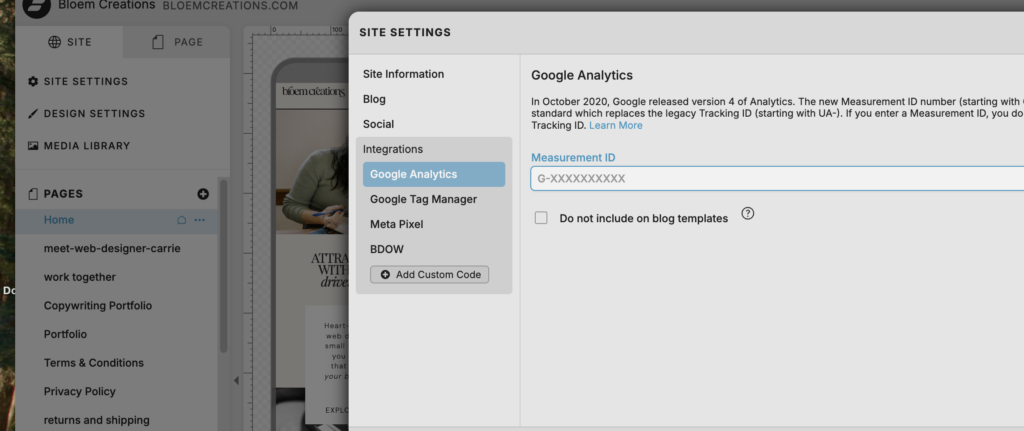
- Google Integration: if you want your Showit website to get found on Google – you have to tell it that you exist! And the best way to do that? Set up Google Search Console and Analytics (here’s my blog that talks you through that!) Now you can quickly and easily set up your Google Tag Manager & Analytics right in the site settings. Making it easier than ever to track analytics and website performance!
Faster Layout Editing Thanks To Layer Grouping
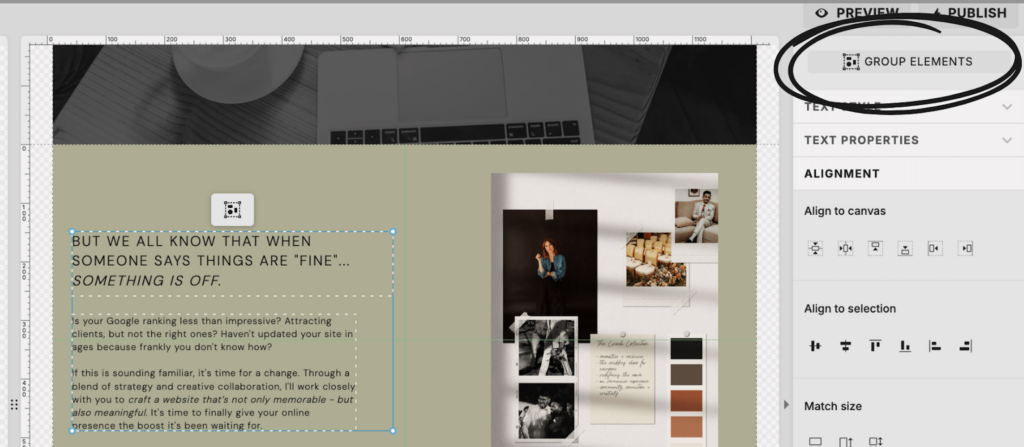
Ok, if you use Canva at all, then you know how lovely and convenient it is when you’re designing and can group different elements so you can adjust them all at once. Right? Well…you can now do that same thing on Showit, and it is GLORIOUS! You can select different design elements (e.g., photo, text, buttons, etc) and then group them! This is SO clutch if you wanna do some quick resizing, moving around, applying click actions, etc! It is a designer’s DREAM!
The Showit Blog
Yet another bonus point for Team Showit assets — the blog is PACKED FULL of easy to follow guides and tips and tricks to boost your user prowess on their platform. It includes both written and visual (video) tutorials – making it great for different learning styles.
It’s another reflection of how incredible their team is, and how much they want to support you in loving and managing your website.
Their Website Platform Is Always Improving
Showit is always making updates improve the platform, streamline processes, and ensure they’re offering the best of the best. Some recent updates I am super excited about include:
- Lottie Animations (lightweight files that allow you to scale animation without (icky) pixelation) is now available! What does this mean? You can add smooth-looking animations (that are also cute, fun, quirky, or whatever else you want) to your site! Here’s a quick insta video talking you through it!
- Brand Colors (formerly known as Design Style Colors) are now a setting inside Design settings and the best part is that if you decide you want to do a little color refresh, you can preview how the changes would look before actually making them! This makes it easier than ever to have fun, play around with your brand colors, and feel confident that any changes will still look good and feel cohesive before you actually commit to them!
Now look, I know I’m biased bc I am a Showit devotee through and through. But honestly, that vast majorify of my clients have started out on other platforms and outgrew them. Showit is one your business can grow and evolve with. And I’m here to help you make the jump, learn more, and have fun along the way.
XX
C
Which of the above would make the biggest difference in boosting your confidence in maintaining your website?
PS: To ensure clients customers feel empowered and confident maintaining their site after launch, I provide a custom video tutorial of their site and exclusive access to my personal youtube tutorial video library to walk you through anything you’d need to know for keeping your site looking its best and working its hardest.
Written by Carrie Bondioli. CEO and Web Designer/Copywriter at Bloem Creations, a web design studio based out of Eugene, OR. Serving creative small businesses and entrepreneurs in the Pacific NorthWest and beyond.
Note: post updated March 2026 to reflect incredible Showit updates